---
title: "Generate and Download High-Resolution QR Codes"
description: "Download print-ready QR codes in high-resolution and professional formats. Get PNG, JPEG, SVG, EPS, and PDF files for business cards, packaging, posters, billboards, and more."
canonical_url: "https://zodqr.com/features/high-resolution-qr-code"
---
> Index of every page on this site: [llms.txt](https://zodqr.com/llms.txt)
[Generate and download high-res QR](https://zodqr.com/auth/signup)
## Supported QR Code Formats and Sizes
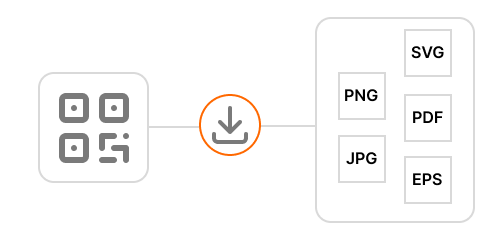
ZodQR lets you download your QR codes in **PNG, JPEG, SVG, EPS, and PDF** formats.
**PNG, JPEG, and SVG** downloads are available for free. **EPS and PDF** downloads need [**Plus subscription**](https://zodqr.com/pricing) (from $6/mo) or above.
You can download raster QR codes in sizes ranging from **128px to 4096px**, making them suitable for everything from website images to high-resolution printing.
## How to Generate and Download High-Res QR Code
### Generate QR from QR code generators without account
When generate static QR codes from ZodQR [free QR code generator](https://zodqr.com/qr-code-generator), you can customize its design and appearance as needed.
When you're ready, click the **Download** button below the QR code preview and choose your preferred format and size.
### Download generated QR code from Dashboard
To download an existing QR code, go to **Dashboard → My QR Codes**.
Find the QR code you want to download, then click the **Download** button on its QR code card.
## Which QR Code Format Should You Choose?
The best format depends on how you plan to use your QR code.
### For Large-Format and Professional Printing
Choose a **vector format** such as **SVG, PDF, or EPS**.
Vector QR codes can be resized without losing quality, making them ideal for:
- Billboards
- Posters
- Product packaging
- Large signs
- Professional printing
**SVG** is available for free, while **PDF and EPS** require a paid plan.
### For Websites and Digital Use
Choose **PNG** or **JPEG**.
These formats are suitable for:
- Websites
- Social media
- Presentations
- Digital documents
- Most standard printing needs
You can download PNG and JPEG QR codes at sizes up to **4096px**.
> **Tip:** If you're unsure which format to choose, SVG is usually the best option for maximum flexibility. It stays sharp at any size and works well for both digital use and printing.
## FAQ
### Is it free to download high-res QR codes?
Yes. You can download QR codes for free in PNG, JPEG, and SVG formats for both static and dynamic QR codes.
### What is the best QR code format for printing?
SVG, EPS, and PDF are the best formats for printing because they are vector formats. They can be scaled to any size without losing quality or becoming pixelated.
### Can I choose the QR code size before downloading?
Yes. You can choose a custom size from 128px up to 4096px when downloading raster formats such as PNG and JPEG.
### Do I need an account to download a QR code?
No. You can generate and download QR codes without creating an account. Some advanced formats and features may require a paid plan.
## Sitemap
See the full [sitemap](https://zodqr.com/sitemap.md) for all pages.