How to Create a free, no expired QR Code with ZodQR
Learn how to create a QR code using ZodQR. Step-by-step guide with tips for better design, tracking, and performance.
 Huong Pham2026-04-30
Creating a QR code is easier than ever - but creating one that actually works well? That’s where most people go wrong.
In this guide, you’ll learn exactly how to create a QR code, plus tips to make sure it’s scannable, effective, and ready for real-world use.
What You Need Before Creating a QR Code
Before you generate anything, decide two things:
1. What Do You Want the QR Code to Do?
QR code is changing alot, with ZodQR you can choose from more than 20 QR code types to create for free, such as:
- URL QR code
- Smart QR code redirecting to different content based on time, location, language
- Digital business card (vCard) QR code with rich content
- QR code for MP3 player
- QR code sharing a PDF without download
- QR code for a PDF collection
- QR code for a landing page for your product or business
- QR code for an online menu for restaurant, cafe or bar
- QR code for WiFi access
- QR code for app download
- QR code for social media links
- QR code for a Google Maps location
2. Static or Dynamic QR Code?
You have two options:
Static QR Code
- Fixed content
- Cannot be edited
- No analytics
Dynamic QR Code
- Editable anytime
- Track scans and performance
- Ideal for business and marketing
If you're unsure, dynamic QR codes are usually the better choice. Read more about the difference between static and dynamic QR codes.
Choosing the Right QR Code Generator
There are many QR code generators out there, but read the pricing carefully before you decide which one to use. And ZodQR is one of the most generous QR code generator that offers many advanced features for free.
With ZodQR, you can:
- Get 5 free dynamic QR codes
- Create unlimited static QR codes for free
- Styling your QR codes to match your brand with custom colors, logo and shape.
- Track QR code performance with analytics
- Edit QR code content anytime
- Download high-resolution QR code images (up to 4096px) for free
Step-by-Step to generate QR codes with ZodQR
Step 1: Select which type of QR code you want to create
From the list of QR code types, select the one that best fits your needs. For example, if you want to share a website link, choose the URL QR code. If you want to share your contact information, choose the vCard QR code.
There are more than 20 types for you to choose:
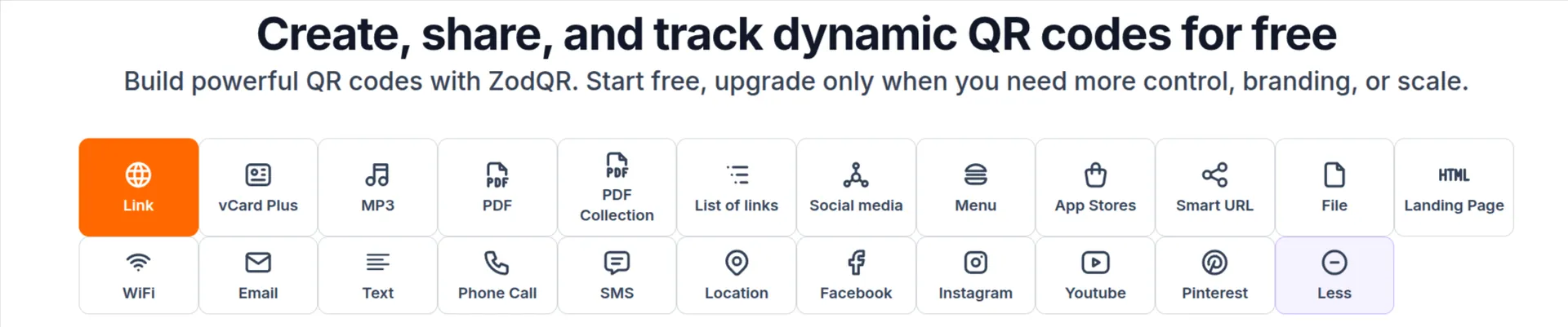
Note that the first 12 types are dynamic QR codes (except Link QR code also offer static type), the rest are static QR codes.
Step 2: Enter Your Content
Next, input the content you want to share. This could be a URL, contact details, WiFi credentials, or any other information depending on the QR code type you selected.
After entering the content, click the "Generate QR code" button to create your QR code.
Step 3: Customize Your QR Code (Optional)
You can customize your QR code to match your brand.
Options Include
- Colors
- Logo in the center
- Shape and style
Important Tip
Don’t overdo it. Always keep:
- High contrast
- Clear structure
- Good readability
Step 4: Generate and Download
Once everything looks good:
- Click “Generate”
- Download in high quality (PNG, SVG, or PDF)
For print, SVG or PDF is best. For digital use, PNG works well.
Step 5: Test Your QR Code
This step is critical.
Before using your QR code:
- Scan it with multiple devices
- Test in different lighting conditions
- Check the QR code content
Never skip testing.
Step 5: Use and Track Performance
Now you’re ready to use your QR code.
Place it on:
- Posters
- Packaging
- Business cards
- Menus
- Websites
If you used a dynamic QR code, you can also:
- Track scans
- Analyze performance
- Update links anytime
Best Practices for Creating Effective QR Codes
Creating a QR code is easy. Creating a high-performing one takes a bit more thought.
Use a Clear Call-to-Action (CTA)
Tell users what they’ll get.
Instead of:
Scan me
Use:
Scan to get 20% off
Scan to view menu
Scan to download the app
Make It Easy to Scan
- Use a minimum size of 2 x 2 cm
- Ensure high contrast
- Avoid cluttered backgrounds
Match the Landing Page to the Promise
If your QR code says:
“Scan for discount”
Then deliver that discount immediately.
Use Dynamic QR Codes for Flexibility
This allows you to:
- Fix mistakes
- Update campaigns
- Improve performance over time
Common Mistakes to Avoid
Here are a few things that often go wrong:
- Not testing before printing
- Using low-resolution images
- Linking to broken pages
- Over-designing the QR code
- Using static codes for changing content
Avoid these, and your QR code will perform much better.
Final Thoughts
Creating a QR code only takes a few minutes—but doing it right makes all the difference.
To recap:
- Choose the right type (static vs dynamic)
- Use clear content and a strong CTA
- Test before publishing
- Track and improve over time
Start Creating Your QR Codes Today
Use ZodQR to create professional, trackable QR codes and turn simple scans into real results.
Because a good QR code doesn’t just work—it performs.